
GROW YOUR BUSINESS WITH
Bot-Master Sender Latest Version Arrive v.17.3.0.0 v.17.3.0.0
Botmaster is a desktop-based WhatsApp automation and bulk messaging software used mainly for:
- Bulk WhatsApp message sending
- Auto-reply bots
- WhatsApp marketing campaigns
- Lead follow-ups
- Customer support automation
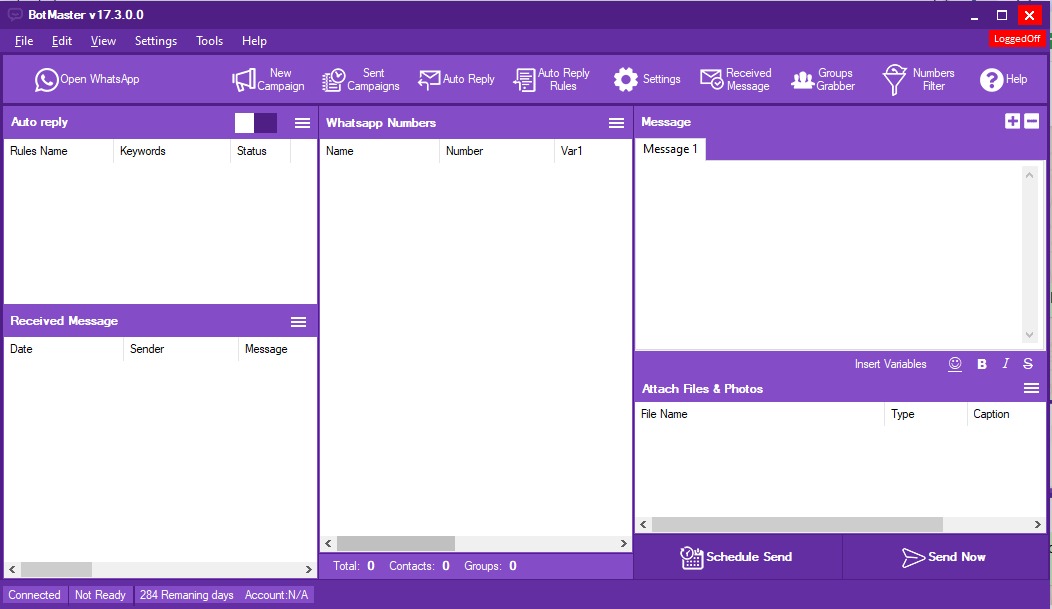
SOFTWEAR FEATURES
Why choose us for your growth
WhatsApp Messaging & Automation
- Send single or bulk WhatsApp messages instantly.
- Create and manage large broadcast campaigns with contact lists or CSV uploads.
- Schedule messages or set recurring campaigns for automated sending.
Contact & Campaign Management
- Organize, import, and manage groups of contacts.
- Extract members from WhatsApp groups to expand reach.
- Clean and filter number lists for valid WhatsApp contacts fast.
Enhanced Messaging Options
- Text, images, videos, audio, PDFs — all supported in campaigns.
- Alternative sending modes to help reduce blocking or rate limiting.
- Variables, spin tags, and name placeholders for customized messaging.
Analytics & Reporting
- Advanced Reports : View campaign stats and message delivery details.
- Delivery Logs : Tracking of message statuses for campaign optimization.
- Monitor live performance metrics as campaigns run, with visual charts help optimize future messaging strategies.
STEP-BY-STEP PROCESS
How to Install? Bot Master Sender
STEP 01
1. Open Windows-based System
- The bulk WhatsApp marketing software is specifically designed for Windows-based systems, including both laptops and computers.
STEP 02
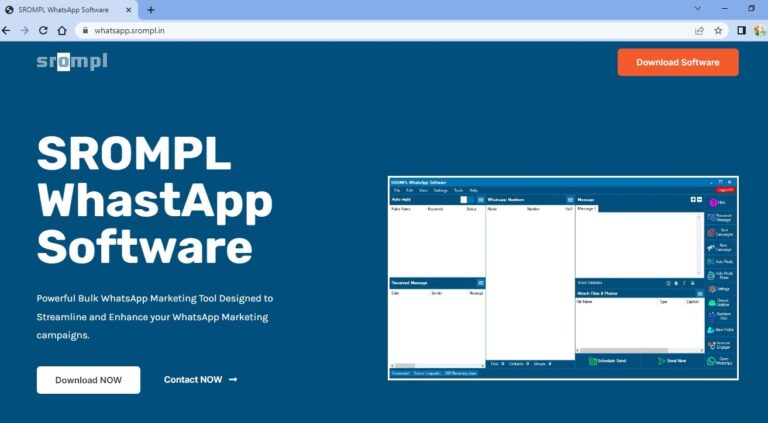
2. Download & Install
- Download software from whatsapp.srompl.in and install on your system.
STEP 03
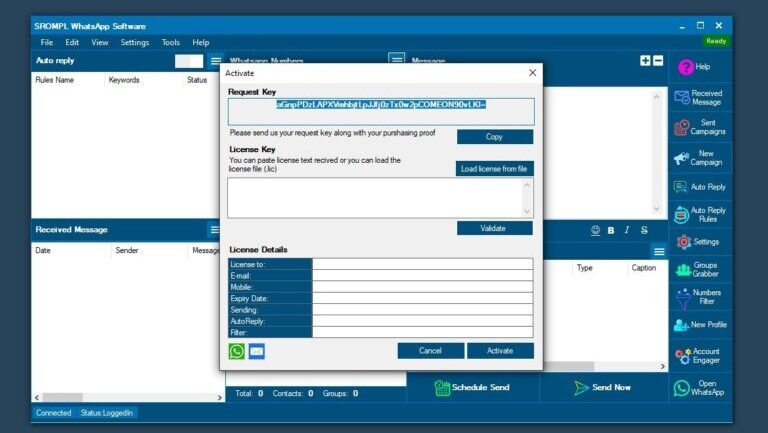
3. Request Key send to us
- After Install successfully, you will show above Pop up menu on your Screen…
- Copy Request Key and send our Executive on +91-8866551808 to Generate Liecence key .
STEP 04
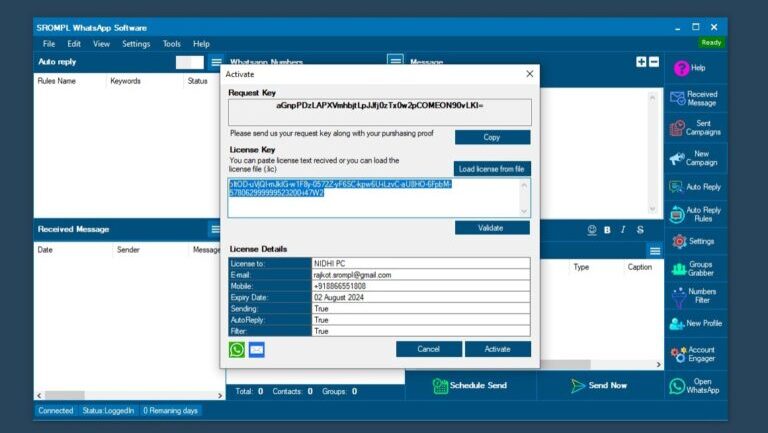
4. Add Licence Key & Activate
- After Generate Your Liecence key, our executive will send you. Paste that key and Click on ACTIVATE. Bruh !! Your Software activated.
STEP 05
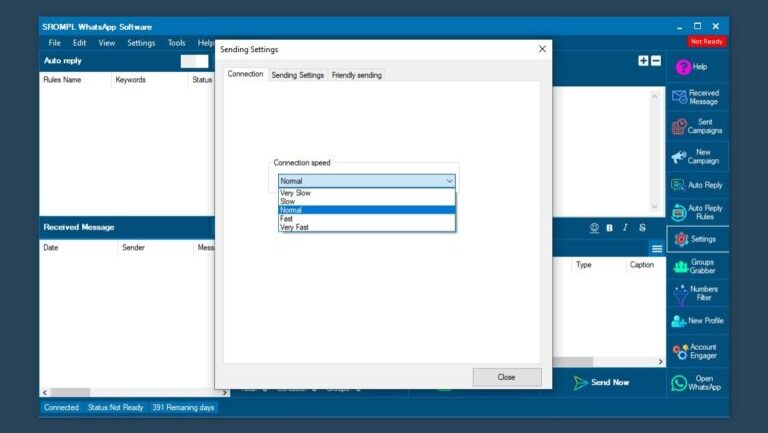
5. General Setting
- Once your Software Activated. You need to do General Setting changes. For that,
- Go to Settings >> Select Connection Speed “NORMAL”.
- This Setting is for Sending Message Successfully without Skip any Number.
STEP 06
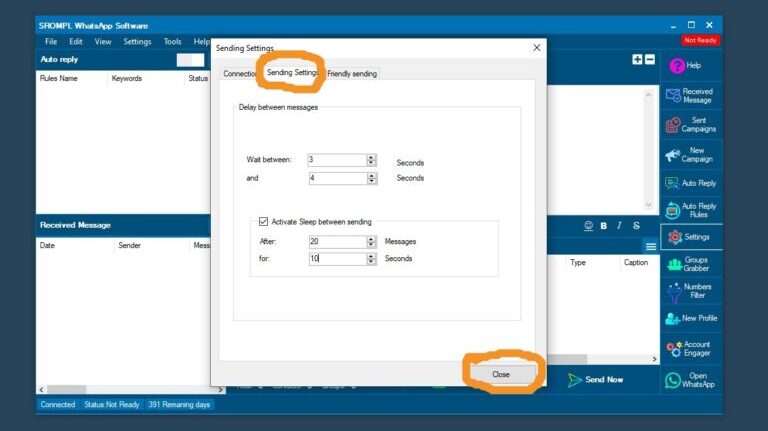
6. Go to Sending Settings
- Delay Between Message.
- Wait Between 3 to 4 Seconds.
- Click on Active Sleep Between Sending.
- After 20 Messages for 10 Seconds.
- After that Click on Close.
This Setting is for Avoid Blocking from WhatsApp.
Bot Master Sender
How To Use? Step-by-step Process
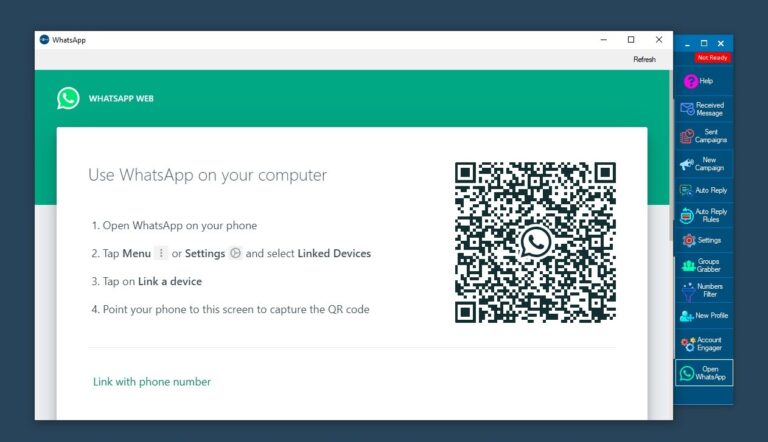
Step 01
- Open Software, Click on Open Whatsapp & Scan your Whatsapp from your Device.
Step 02
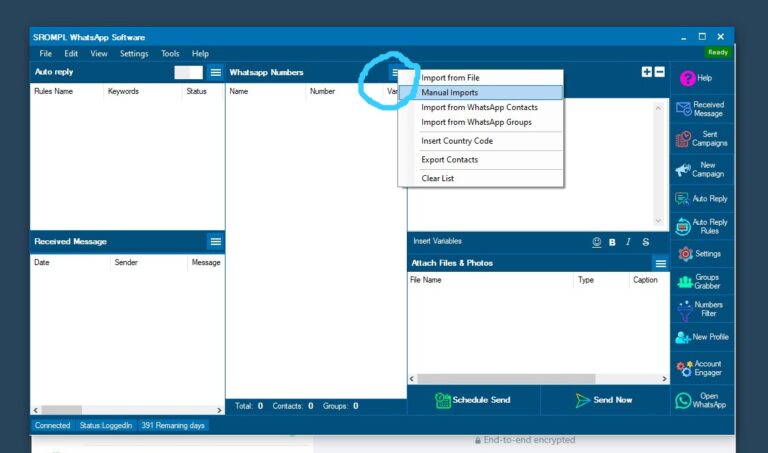
- Click on Three Line & Go to Manual Imports.
Step 03
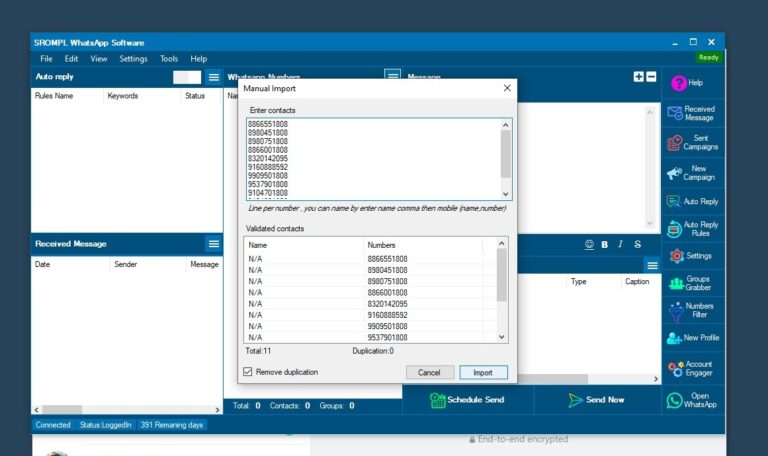
- Copy Number from anywhere and paste in Box & Click on Import.
Step 04
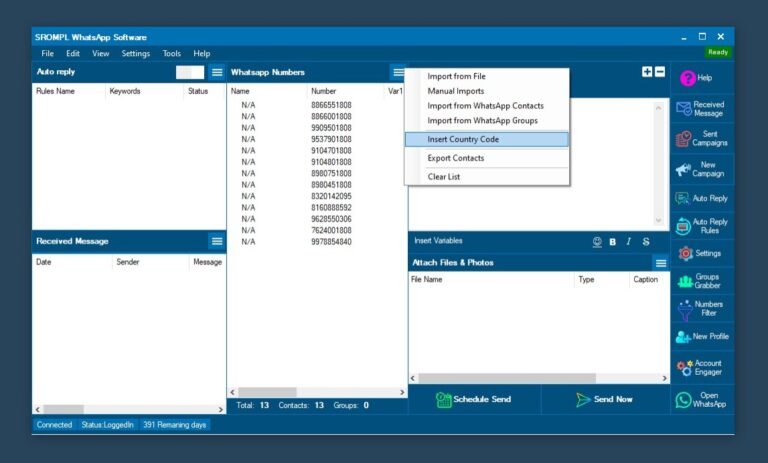
- If your number does’t have Country code, then Go to Three Line >> Insert Country code. Write Country code in that Colum (For Example India Country code : 91, the write 91 in column. ) then click on OK.
Step 05
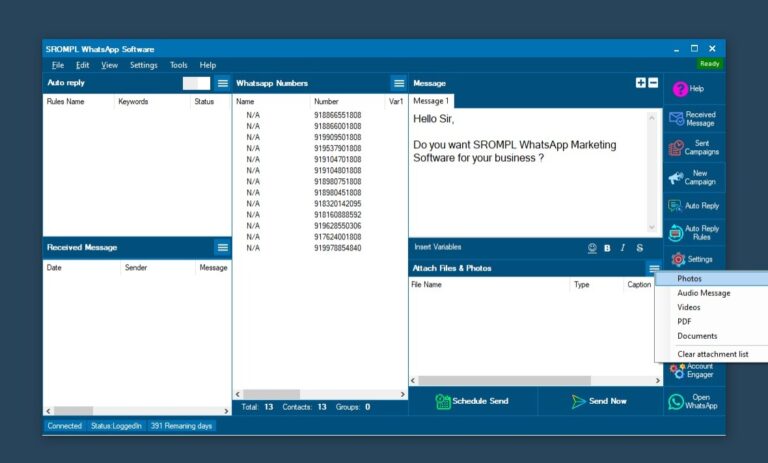
- Write Any Message in Message box… If you want to attach any file like Photo, pdf, video, audio etc the click on the three line in attach files & Photo section then select your file from your Device.. EXCEL file not allowed to send by this Software.
Step 06
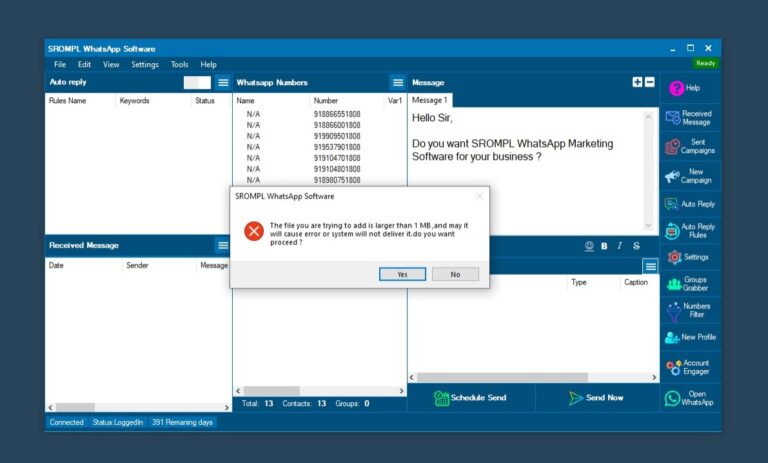
- If you try to attach if file larger then 1 MB, then you will show this dailogue box to remind you about your file size. It is Always happen in pdf, audio, video and document file. Click on YES.
Step 07
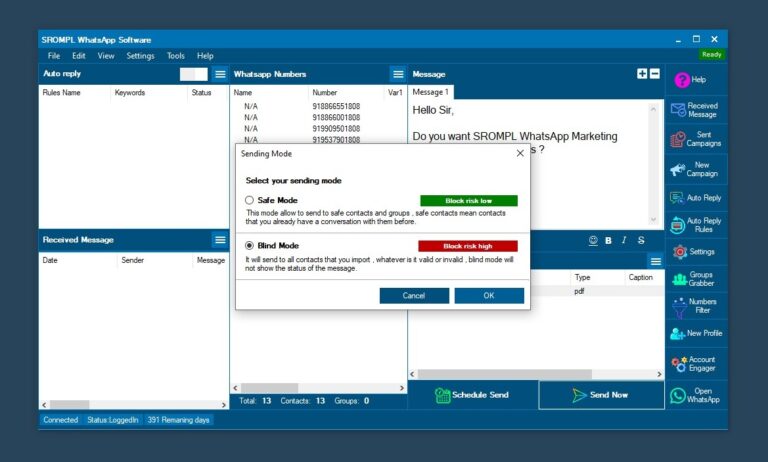
- After Attached File, Click on SEND NOW. you will show one dailogue box as shown in Picture. REMEMBER Always Select Blind Mode to do Campaigns Successfully. Then Click on OK.
Step 08
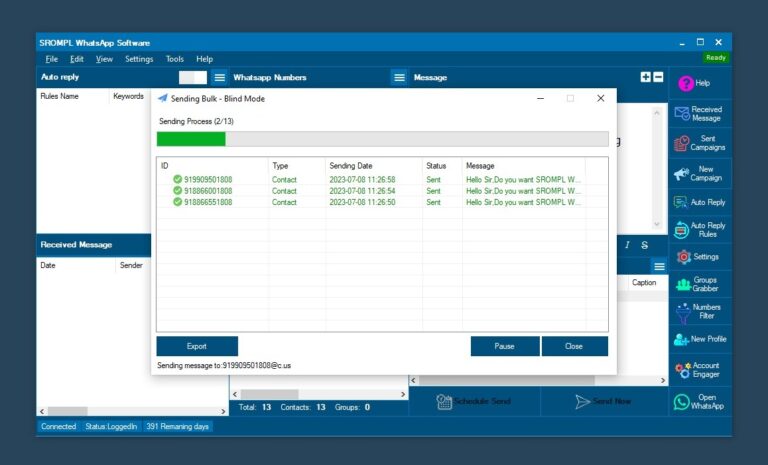
- BRUH !!! You campaign start. ENJOY Unlimited Whatsapp Marketing Software.
Step 09
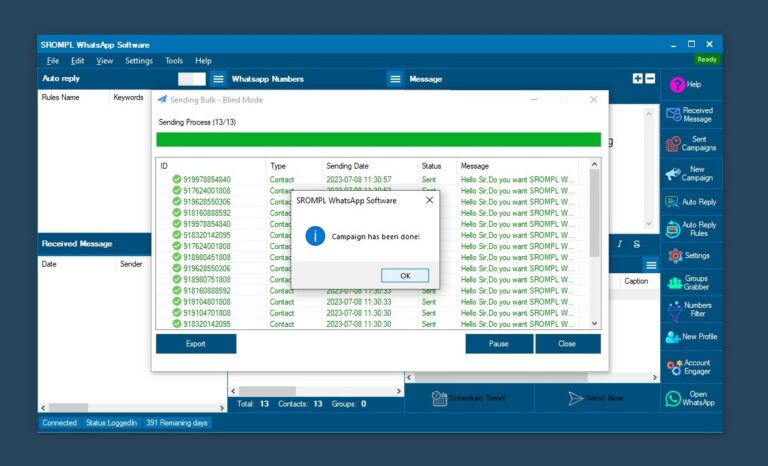
- Once Campaign Complited. you will show dailogue box of complition. Click on OK. Close the “Sending Bulk – Blind Mode”. After that you can add Another Campaign with same procedure.
WHATSAPP BLOCKED
Why WhatsApp Blocked your number?
There are several reasons why WhatsApp may have banned you. Let’s take a look at some of the potential reasons:
01
Using modified WhatsApp applications.
Many Android users use WhatsApp mods like WhatsApp Plus or GB WhatsApp for extra features such as customization, original-quality downloads, and large file sharing. However, WhatsApp discourages their use and may temporarily ban your number if a mod is detected. Switching back to the official app usually removes the ban.
02
Getting blocked by a large number of users.
WhatsApp may also ban your account if many users block or report you. This often happens due to spammy behavior or sending harmful files or viruses. While this system helps stop scammers and hackers, ignoring WhatsApp’s rules can also get genuine users banned.
03
Sending a lot of messages to users who don’t have you as a contact.
Sending a large number of messages to users who don’t have you as a contact can be quickly flagged as spam. This means that users can easily report you and you’ll end up with your WhatsApp number blocked.
04
Sending harmful files, viruses, or malware.
WhatsApp strictly prohibits users from sending anything that it can detect as a virus or malware. As a consequence, if you’re sending files that can be flagged as potentially harmful software, WhatsApp will block your number.
05
Modifying WhatsApp.
WhatsApp’s Terms and Conditions clearly state that modifying the application files is considered a bannable offense. Consequently, attempting any action towards customizing the file, re-engineering, altering file contents, or even decompiling or extracting code can easily lead to having your WhatsApp number blocked.
06
Sending messages through bulk messaging or outside your contacts list.
You can also get banned from WhatsApp if you attempt to send a large number of messages using bulk messaging, auto-messaging, or auto-dialing. The same applies if you try to send a large number of messages to people outside your contacts list as mentioned in point 3.
These are easy ways to get yourself reported by many people and have your account flagged.
These are easy ways to get yourself reported by many people and have your account flagged.
07
Hacking WhatsApp servers or disrupting WhatsApp services.
This seems like a no-brainer but attempting to hack WhatsApp servers and disrupting their services will get you banned in no time.
08
Inappropriate conduct.
WhatsApp can be quite wary regarding its users’ safety and improving their experience using the app. Therefore, it takes any reports about harassment quite seriously. Violent behaviors, death threats, ethnic or racist comments, and such can easily get your WhatsApp number blocked. Similarly, illegal, obscene as well as sexist statements, are also wholly prohibited.
09
Impersonating other users or creating fake accounts.
WhatsApp also takes extra measures to ensure that none of its users are being imitated. Hence, creating counterfeit accounts or impersonating other users is an easy way to get your WhatsApp number banned. So be wary if you use someone else’s name or pictures on your profile.
10
Having your groups mass reported.
Similar to reason 2, if your groups are flagged by a large number of users, WhatsApp will ban your number.
11
Creating groups and adding random people.
Even though WhatsApp doesn’t have a limit in the number of groups you can create, creating too many groups and adding random people can create problems. if you create too many groups and add people that don’t have you as contact might get your WhatsApp number blocked.
12
Sending the same message to many people.
Similar to point 6, sending the same message to many people can get your number banned. WhatsApp may consider it spam and block you. Note that this applies even if you send the message to your contacts.
To avoid getting your WhatsApp number banned, to send a message to many contacts, you can use the Broadcast feature.
To avoid getting your WhatsApp number banned, to send a message to many contacts, you can use the Broadcast feature.
13
Joining many groups in a short time.
Joining a large number of groups in a short time might create issues. WhatsApp might identify you as a bot and get your number blocked.
14
Repeated infringement of WhatsApp terms and conditions.
If WhatsApp finds out that you’ve repeatedly infringed their terms and conditions, they may ban you from their service. So, if you’ve been notified of some infringing activity, be extremely careful since another violation might get your WhatsApp number blocked.

then what should do
Tricks & Tips to Avoid Number Block By WhatsApp
- Avoid to send msg to unknown people or unknown database.
- Dont spam a lot from single whatsapp channel.
- Add atleast 15-20 number in your database who can revert you on your msg (it will be two way communication so number ban chances is very less).
- Use catchy & attractive content in your campaign so people will revert you. Make your msg informative not only advertising purpose.
- If atleast 5-10% people replied you on your whatsapp msg then its a good campaign and whatsapp find good two way communication so again number bann chances is less.
- In Beta Blaster panel you can add upto 1000 WhatsApp channels. So we suggest send less sms from a single number with high time delay and use multiple whatsapp channel to blast your campaign.
- Remember no buddy can predict about number bann but you will reduce ban chances if follow above steps. If you spamming a lot from single number, very few reply and huge campaign. Whatsapp will ban your number soon.
For Installation Support,